Remote verification
Users can upload their personal signature or seal and sign documents with the law firm. This verification carries full legal effect.
LegalTech · iOS + Android + CRM
A LegalTech project: a mobile app for iOS and Android plus a CRM system, where we delivered both the front end and the back end. Built for an international law firm so that clients in different countries can sign documents remotely.
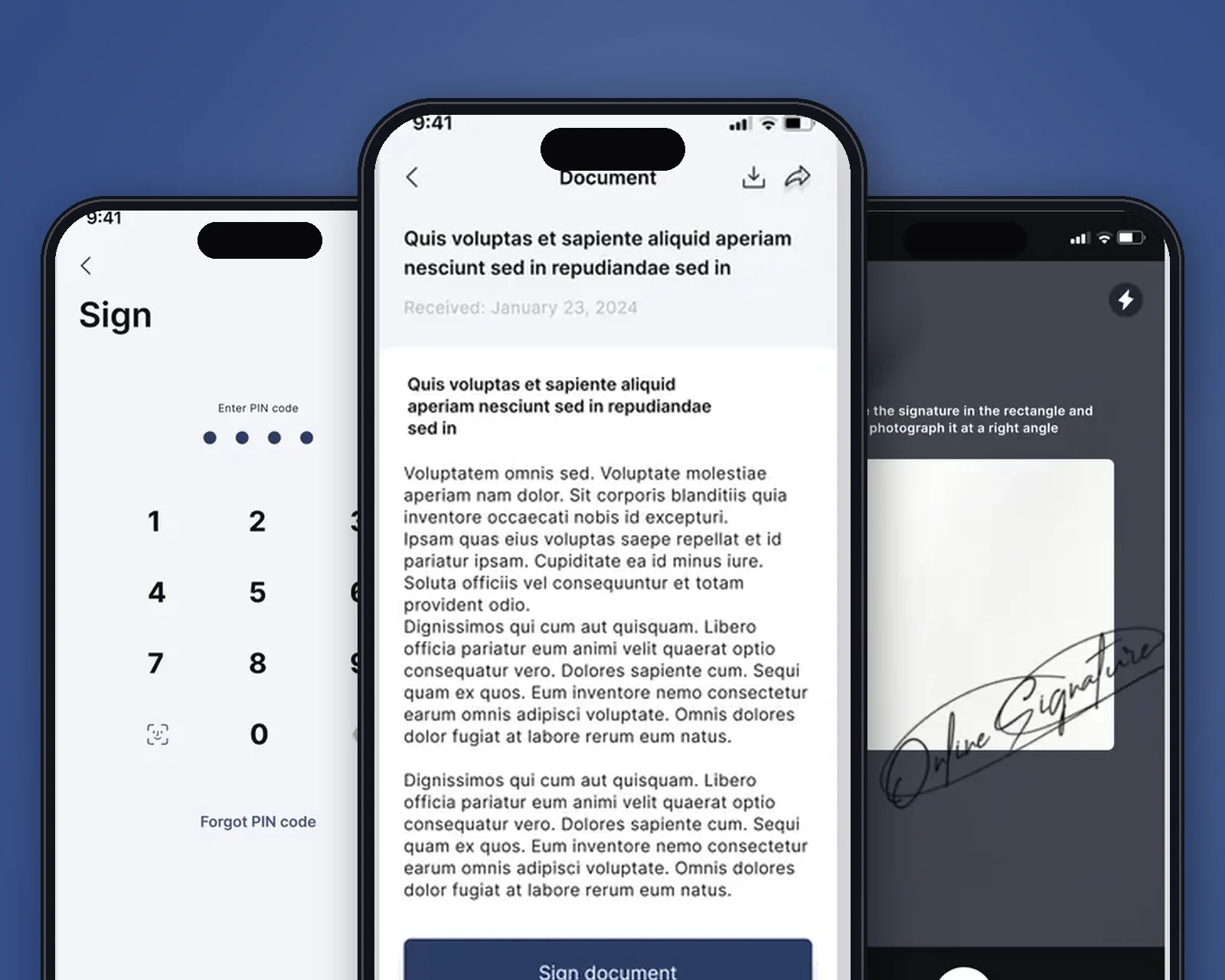
In short: what the product is and who we built it for.
SignatoryPro is a LegalTech product for an international law firm that specializes in the sports industry and works with clients from many countries. The client wanted to simplify its document workflow so that a client in any country could sign documents remotely, conveniently and with legal effect, without visiting the office in person.
We designed and built a pair of native mobile apps (iOS and Android) together with a web CRM for lawyers. The client completes verification, uploads a signature or company seal and signs documents, while on the firm’s side lawyers manage clients, send contracts for signature and control notifications, all within a single system.
The goal of the project was to find a way to simplify the document workflow and make signing documents convenient for clients in different countries.
How we built the product, from architecture to process.
We chose native development for each platform, Swift for iOS and Kotlin for Android: it gives access to the device file system and biometrics, which is critical for uploading and signing documents. The server side and business logic were built in PHP (Symfony), and the CRM interface for lawyers in React.
The team worked in Agile/Scrum with two-week sprints and regular demos for the client. We started with the core, remote verification and legally binding signing, then added the digital archive, flexible notifications and integrations (SMS, SMTP, remove.bg, WhatsApp Business API, Firebase) to cover the full document workflow cycle.
Tools chosen to fit the product’s goals.
 SwiftNative iOS app
 KotlinNative Android app
 ReactFront end of the CRM for lawyers
 FirebaseMailings and push notifications
Native Swift and Kotlin apps were chosen for working with documents and signatures: access to the device file system, native upload and save dialogs and biometric authentication all require a native environment. A cross-platform approach limits access to system APIs that are critical for legally significant operations.
The CRM back end runs on PHP Symfony with a React front end, a mature stack for building operator workspaces, managing the verification queue and keeping audit logs. Alternatives were considered: Laravel (less ORM control for complex transactions) and Node.js (less familiar for a document workflow team). Symfony won thanks to strict entity typing and its built-in ACL mechanism.
Key capabilities that solved the business problem.
Users can upload their personal signature or seal and sign documents with the law firm. This verification carries full legal effect.
Users can upload documents to be signed later and receive documents that are ready.
The digital archive stores every signed document and supports search by date and title.
An administrator can set how often notifications are sent and edit the message content.
Key product screens, step by step.
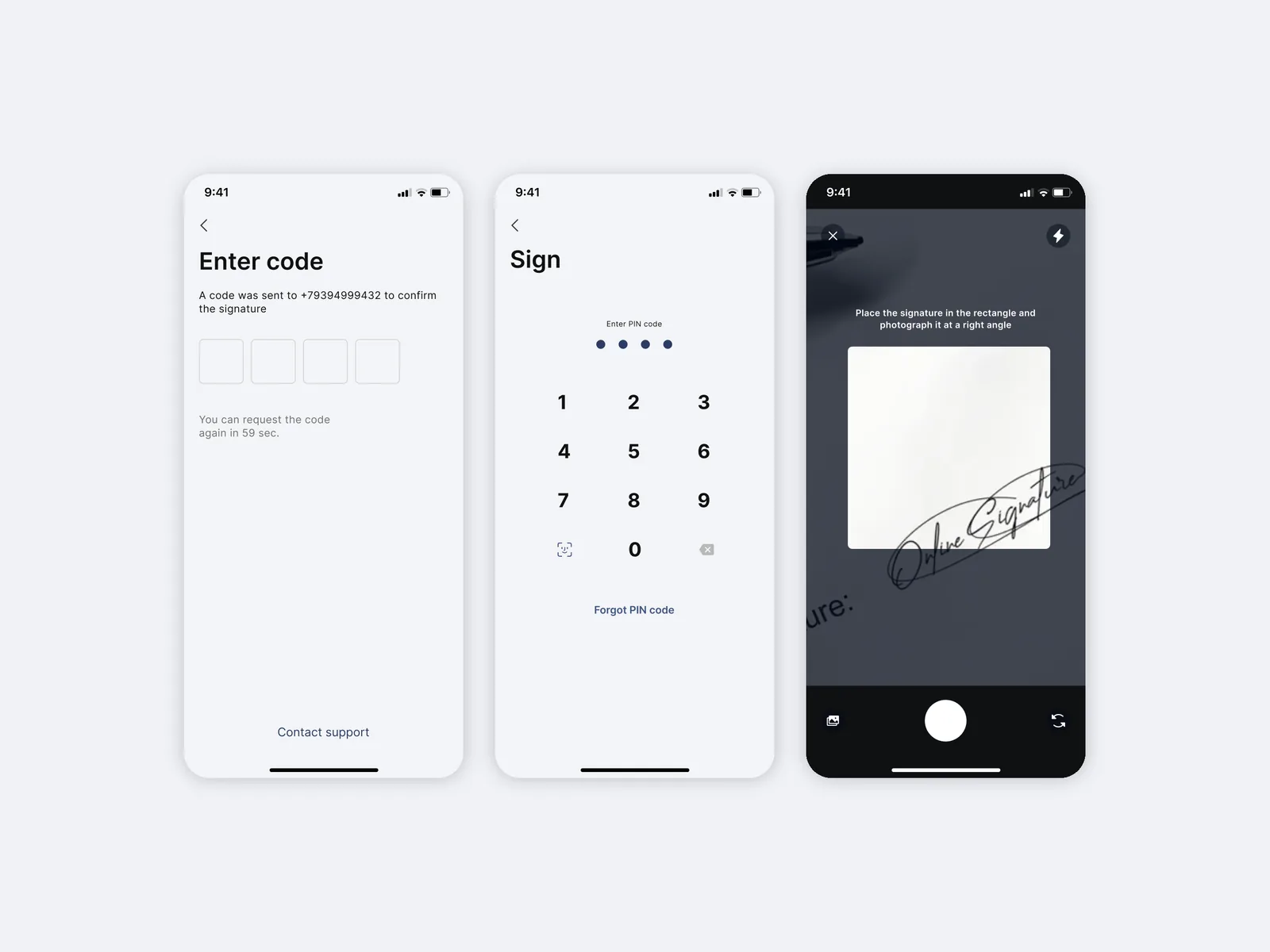
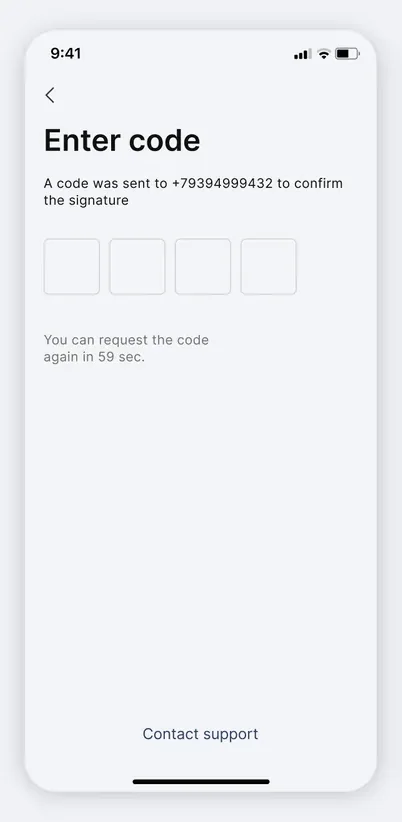
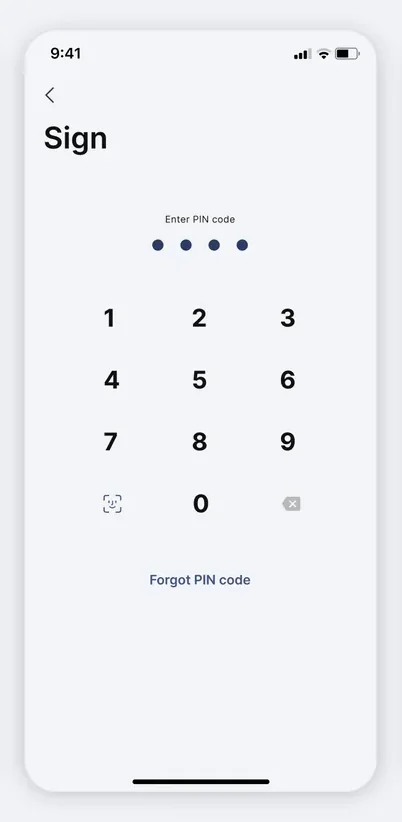
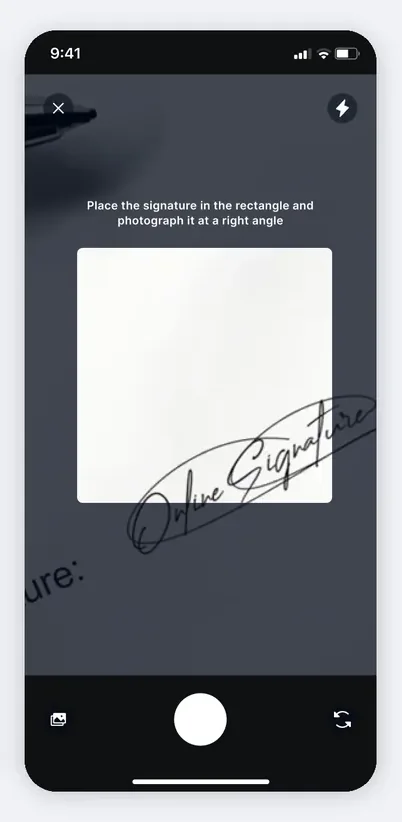
The client’s first contact with the product on iOS or Android: a “Fill in the form” screen with personal data fields, a document screen with a large “Sign document” button and an “Add signature” step where the user uploads a handwritten signature, shown on screen as a gold stroke on a white background.
In a few steps a client from any country completes verification and links their signature, so they can then sign documents remotely and with legal effect, without visiting the office.
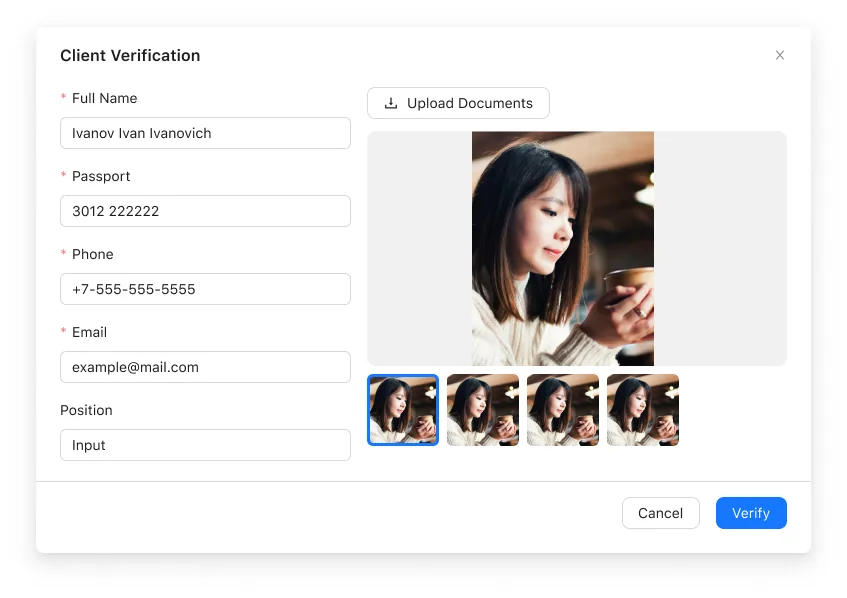
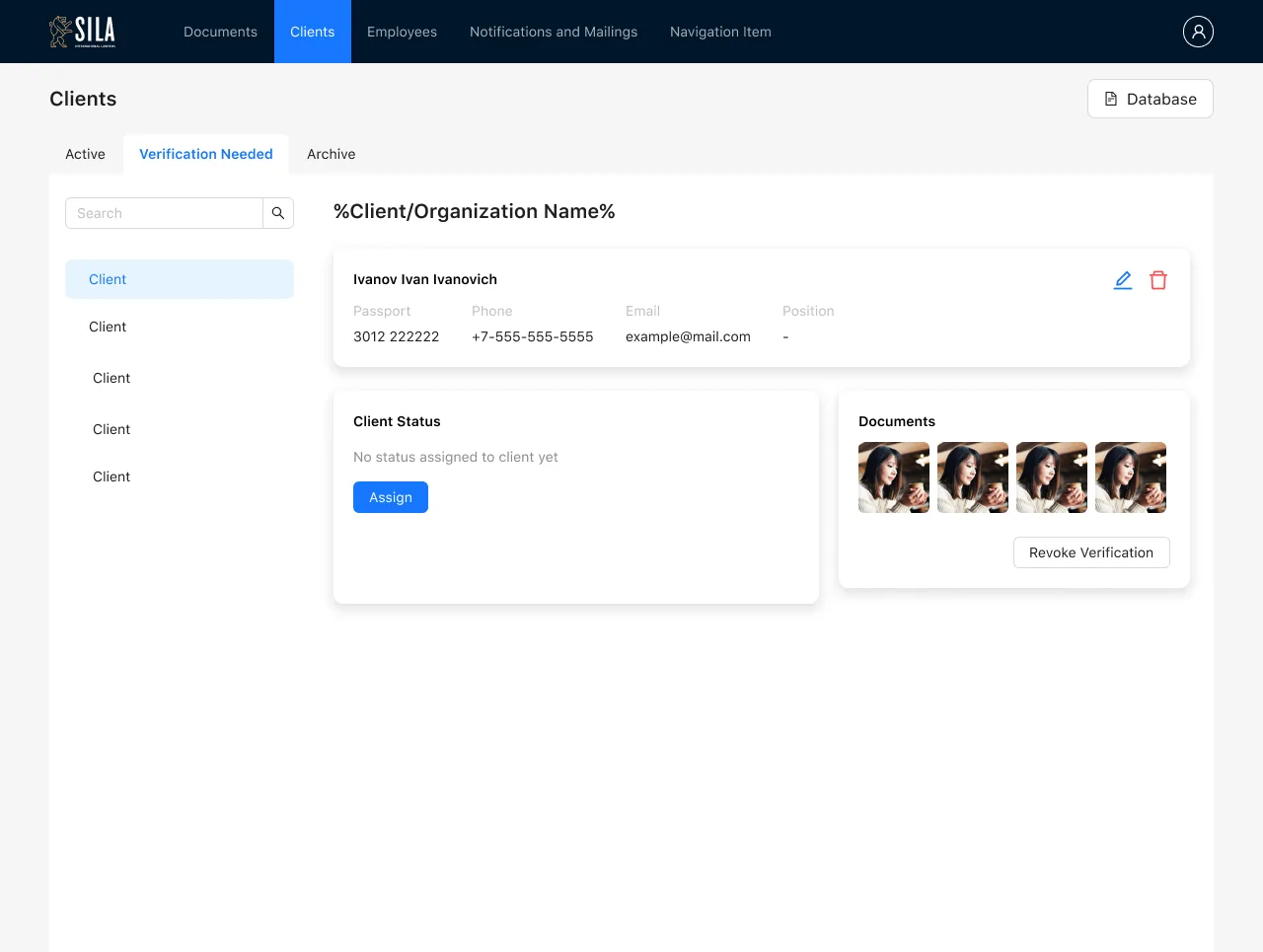
The Clients section of the web CRM (SILA) has Active, Needs verification and Archive tabs. Opening a client brings up a three-step verification modal: “Check”, with full name, passport, phone and a document photo upload; “Client status”, with a choice of individual, sole proprietor or legal entity and the company’s registration details (tax and registration numbers, CEO, registered address); and “Manager”, where the responsible person is assigned.
The step-by-step wizard turns verification into a clear sequence: the lawyer does not miss required data, and the client’s status and responsible manager are recorded at once, which speeds up checks and reduces the risk of errors.
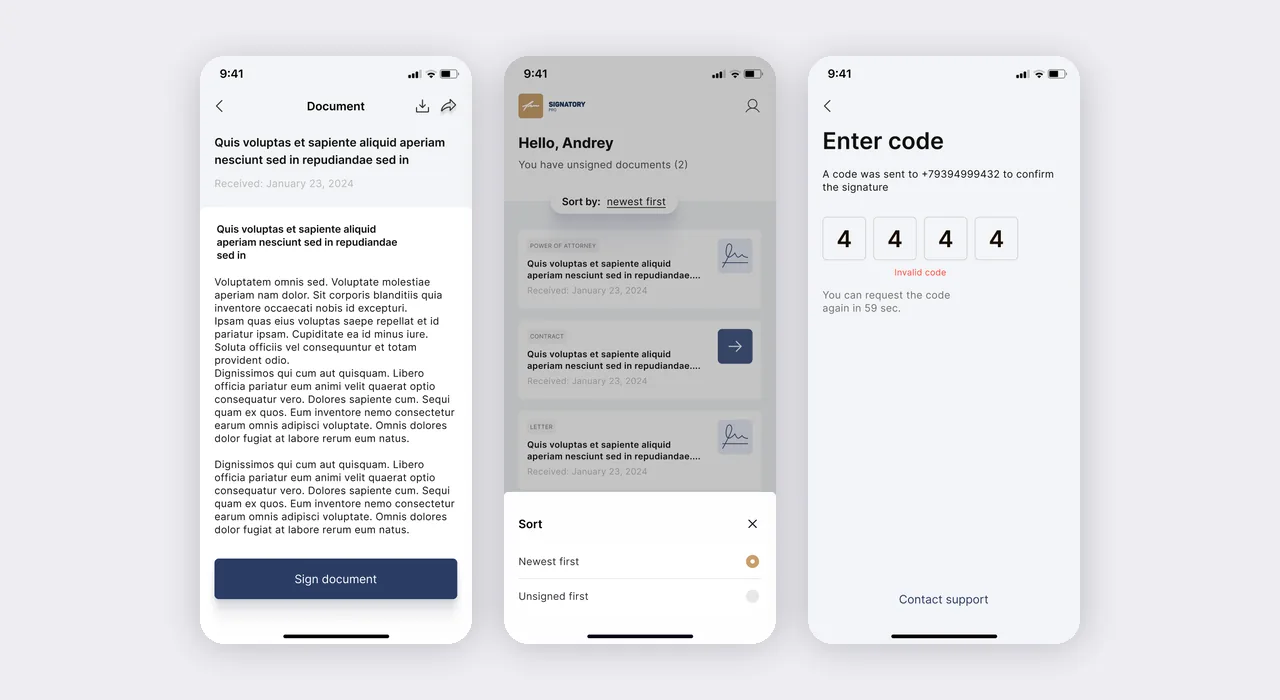
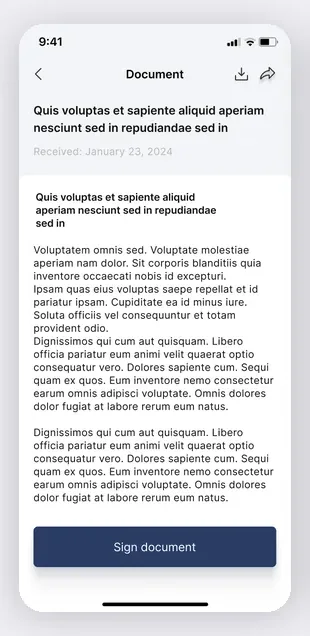
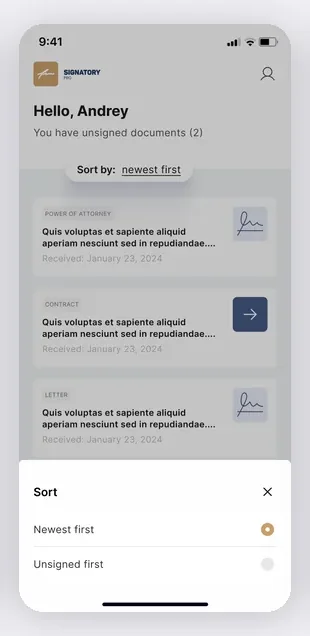
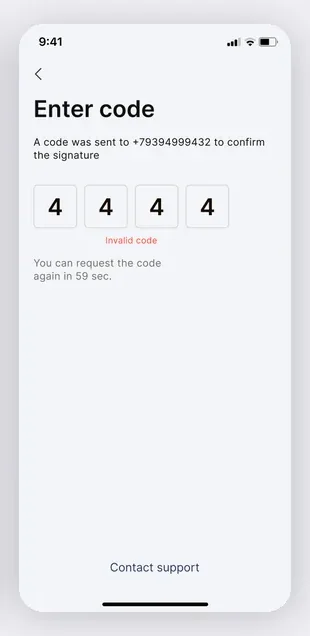
The app’s home screen: “Hello, Andrey — You have unsigned documents (1)”, a document feed with types (power of attorney, contract, letter), date received and “newest first” sorting. Next to it are an open document with a “Sign document” button and an “Enter code” screen for the SMS code sent to the client’s phone number.
The client immediately sees what is waiting for signature, reads the document and confirms the signature with a one-time code; SMS authentication protects the operation and gives it legal significance.
The lawyer’s workspace in the CRM: the Clients → Active section with a “Contracts for signature” table showing Title, Manager, Status and Action columns. Statuses are color-coded (Sent, Signed, Revoked), rows can be printed or revoked, and pagination sits at the bottom.
The lawyer sees the whole signing pipeline in one list, where a document is waiting for the client, where it is already signed and where it has been revoked, and manages the process without losing a single contract.
The “Notification and mailing settings” section lists push messages with type, dates and statuses (including Paused), with an “Edit message” modal on the right. It lets the admin choose the type (automated or custom), title and text, a “Duplicate to WhatsApp” flag, start and end dates, time, a Weekly frequency with selected weekdays and the list of recipient clients.
The administrator flexibly sets who gets reminded about unsigned documents, when and how often, and duplicates messages to WhatsApp, which raises the share of documents signed on time without manual calls.
The platform processes personal data of the law firm’s clients from different countries, so data protection is built into the architecture.
Documents are accessible only after successful SMS authentication, and CRM roles (operator, manager, administrator) limit which documents each user can see. Data travels over a secure channel.
Client data is processed under the requirements of the client’s jurisdiction and stored on locally hosted servers, with role-restricted access.
2 native apps (Swift for iOS, Kotlin for Android) and a CRM system on PHP Symfony + React form a single verification platform.
Remote verification of signature and seal with legal effect: the client uploads a signature in the app, and the CRM confirms their identity.
Documents are uploaded and received in the app, with no need to be present in person.
A searchable digital archive of signed documents.
SMS authentication confirms the client’s identity before signing.
Agile/Scrum delivery: two-week sprints and a client demo at every stage.
The cost depends on the number of platforms, the complexity of verification and the requirements for processing personal data. An MVP falls within the standard industry range for custom mobile development; we give an exact estimate after discovery.
Verification is based on uploading a signature sample through the app and confirming identity with an SMS code. The CRM keeps an audit log of the operation. Legal effect is defined by the agreement between the parties to accept electronic document exchange, not by the technology itself.
Working with documents requires access to the file system, biometrics and system dialogs, which are native APIs. Cross-platform solutions (Flutter, React Native) limit access to these APIs and add a layer that reduces reliability for legally significant operations.
Documents are accessible only after SMS authentication, and CRM roles limit visibility. Client data is processed under the requirements of the client’s jurisdiction and stored on locally hosted servers. Data is transmitted over a secure channel.
Timelines depend on the number of platforms, the complexity of verification and integrations. The typical range for an MVP with two mobile apps and a CRM is 16–28 weeks (an industry benchmark, not a commitment for a specific project). We fix exact timelines after discovery.
Companies from retail, medtech, logistics and e-commerce that we helped build digital products.


The full spectrum of development — from native mobile apps to web platforms, AI and cloud. Pick a direction or order a turnkey project.
Native iOS & Android plus cross-platform Flutter and React Native — from MVPs to apps with millions of installs.
Learn moreNative Swift / SwiftUI iOS apps — with Apple Pay, Sign in with Apple, App Store Connect deployment pipelines.
Learn moreNative Kotlin / Jetpack Compose Android apps — Material 3, Google Play release pipelines, Firebase integration.
Learn moreSingle Dart codebase across iOS, Android, web and desktop — with native modules where needed.
Learn moreProduction web apps on React, Next.js, Vue and Node — SaaS dashboards, B2B portals, marketing-conversion stacks.
Learn moreREST, GraphQL and gRPC APIs — designed for partners, mobile clients and internal microservices.
Learn moreBespoke platforms for mid-market and enterprise teams — internal tools, vertical SaaS, mission-critical backends. Discovery to launch in 12–36 weeks.
Learn moreFocused MVPs in 12–20 weeks — one or two integrations, real users on day one, telemetry built-in.
Learn moreEnd-to-end ownership of a digital product — design, build, ship and continuous evolution.
Learn moreTool-using agents that plan, retrieve, act and self-evaluate — in customer service, ops automation, internal copilots.
Learn moreAWS, Azure and GCP architecture, Kubernetes, Terraform/Pulumi, CI/CD and observability — SRE-grade operations for product teams.
Learn moreTechnical SEO, Core Web Vitals, structured data, internal-link architecture — built into your engineering process.
Learn moreRelated cases
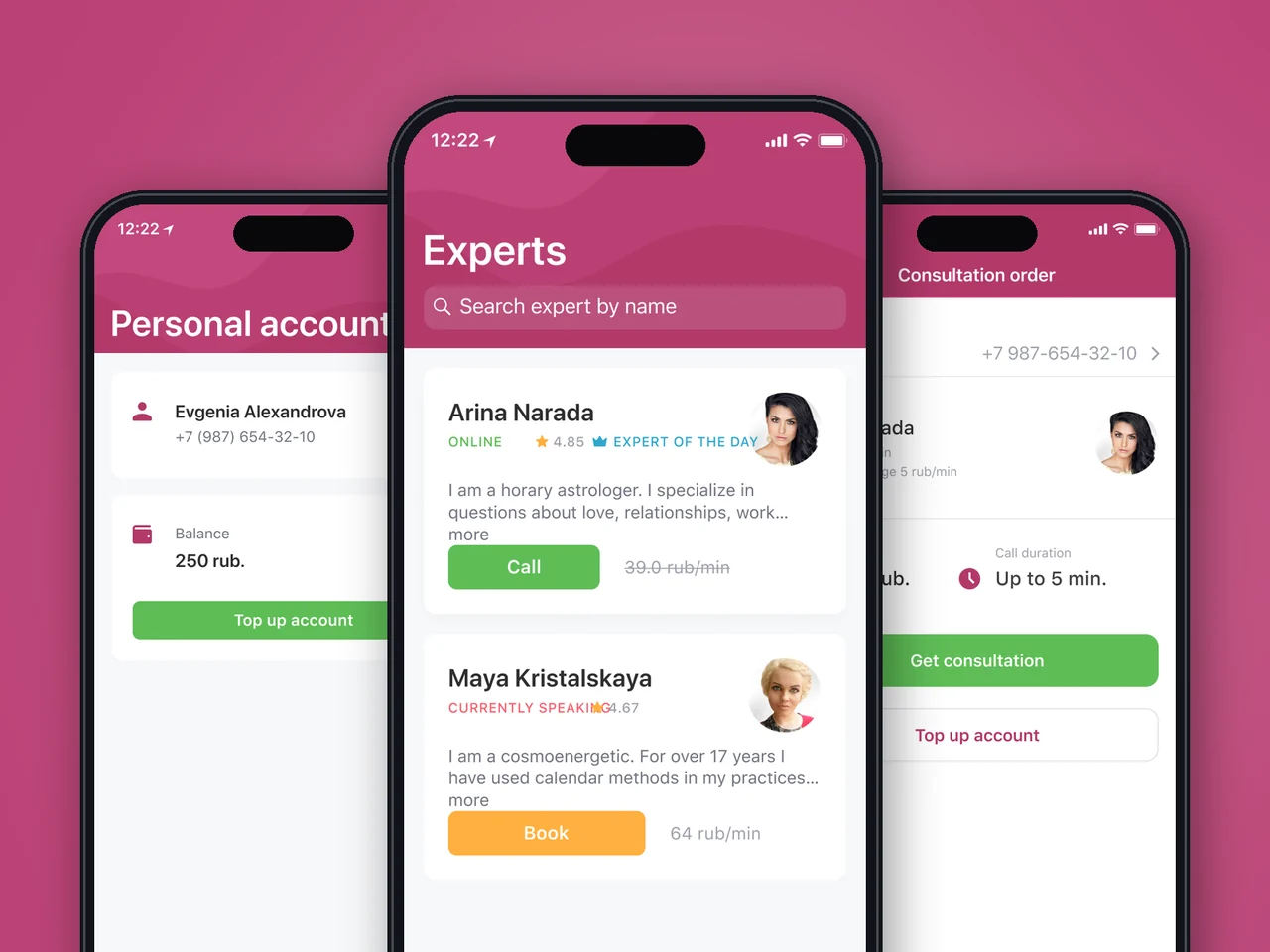
Flutter Android app mirroring a web consultation service: expert catalog, instant callback, per-minute billing and wallet. Released on Google Play in 3 months.
View case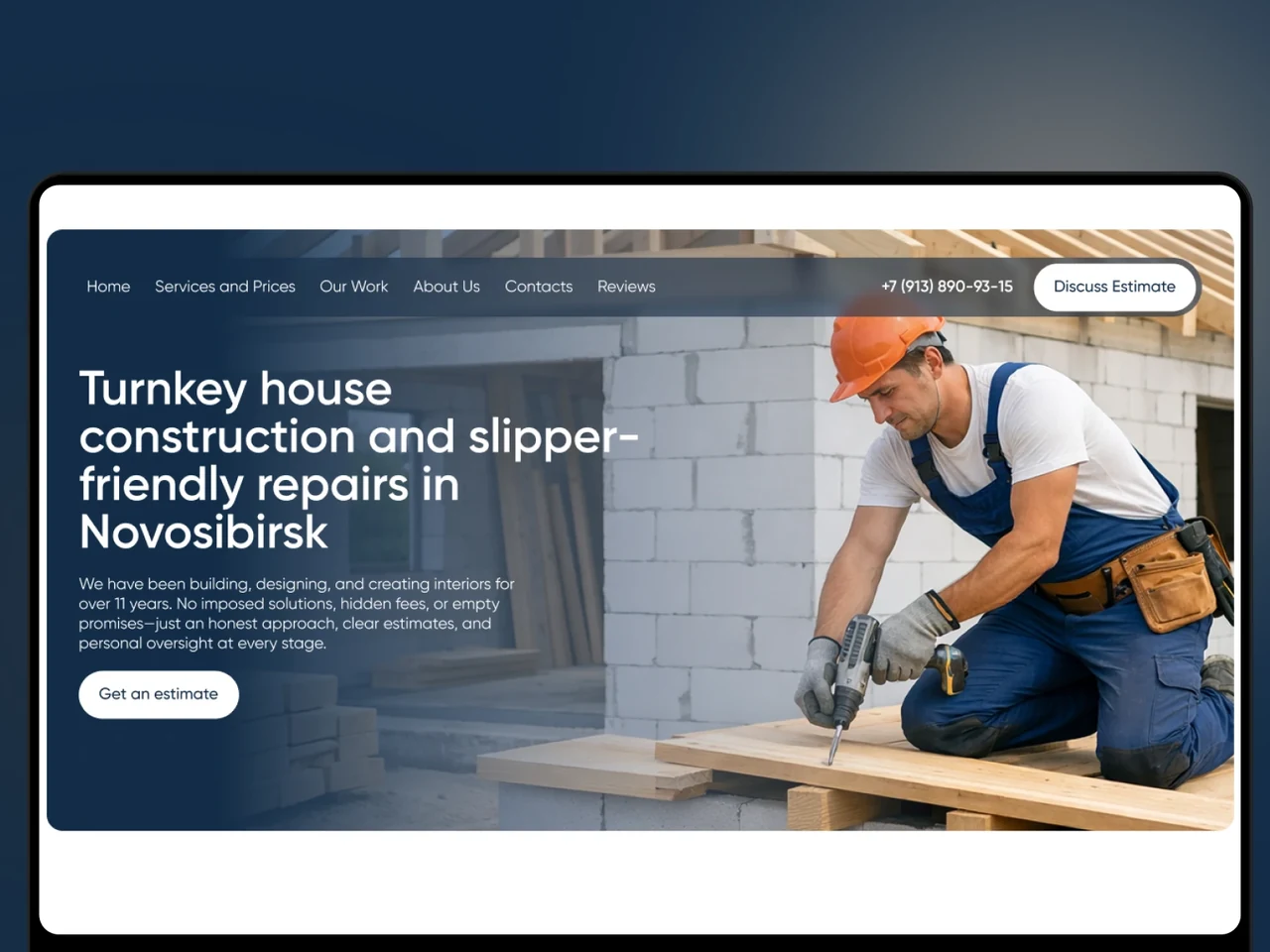
A Tilda website for a Novosibirsk builder that turns traffic into estimate requests: per-m² pricing, real projects, an object map and verified reviews.
View case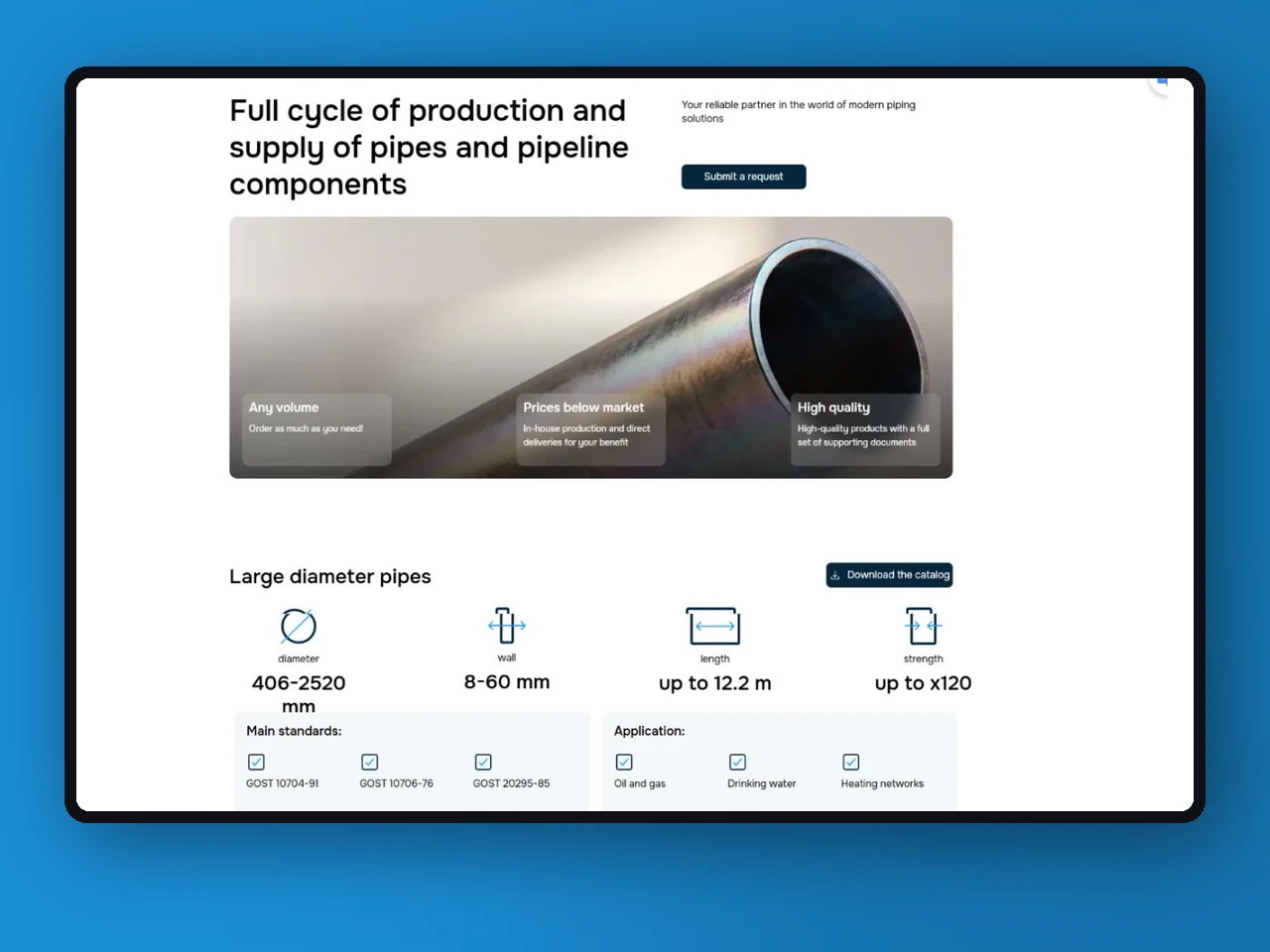
A Tilda landing page for a pipe manufacturer, launched in 2 weeks: product specs, standards, a PDF catalog without sign-up and a lead form.
View case20 articles across 5 categories — engineering-led guides on AI, SaaS, MVP, compliance and mobile for US and EU product teams.

Performance-tested comparison of RN (New Architecture) and Flutter (Impeller) across hiring, time-to-market and EU/US compliance.
Read article
Real cost ranges by region (US onshore, Western EU, EU nearshore), team and feature scope. With a worked fintech example.
Read article
Data-driven framework for choosing iOS-first or Android-first in 2026 — US & EU market share, ARPU, review timelines, EU DMA.
Read articleTell us how your firm handles documents and signatures today, and we will help you design a secure remote workflow. Let’s discuss how a similar solution could work for your business.
Share a few details and a senior consultant will reply within one business day.
Email: sales@yusmpgroup.com
Phone: +374 44 871 811
Offices: KAMAR Business Center, Vazgen Sargsyan St. 2, Yerevan, Armenia · Remote — East-Coast US overlap (9 AM–1 PM ET)